I. Introduction
II. Usage
III. Help
I. Introduction:
eNom Domain Grabber was developed by Domain Software, LLC., to work with eNom.com’s reseller API interface. The software will submit the specified domains in the Domain List box to eNom’s reseller server. The server will collect the data sent, attempt to register the domains you specified, and return the results back to the program. The results from the server will be logged to eNomlog.txt in the format:
Date Time - Domain - # of Tries.
An example of the log is as follows: 10/15/2002 06:35:05 - Test.com - #25.
The following tells you that on October 15, 2002 at 6:35:05 AM the domain Test.com was submitted for the 25th time. The results are logged when eNom responds with data to confirm the domain was sent.
II. Usage:
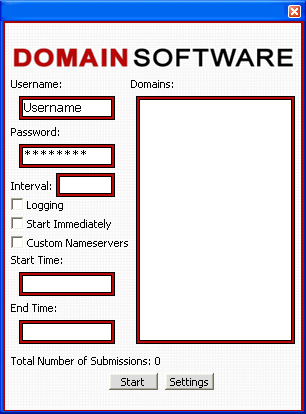
To begin using eNom Domain Grabber, the fields for Username and Password must be filled in with a valid eNom reseller account.
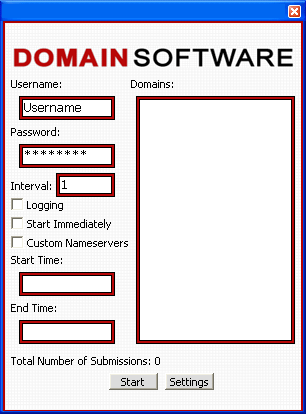
The Interval Time dictates how many seconds between each submission of a domain. The Interval Time can have a max value of three values. In which case the maximum value is 999, which equates to 16.65 minutes. If the interval is set at its default value of one, then all domains in the list will be submitted at a rate of two/second. This is the fastest rate that can be acquired to comply with eNom’s regulations. However, if you wish to extend the delay you can. For example, an interval of 30 would mean every 30 seconds two domains in the list will be submitted. As a result, if six domains are in the list it will take 1 ½ minutes to complete all six domains.
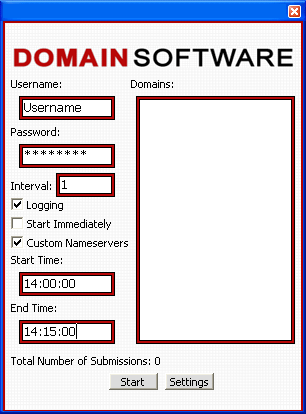
eNom Domain Grabber has two methods of starting. First, you can click Start Immediately and bypass entering the Start Time and End Time. Or you can check Start Immediately, after which you need only click the Start button for the domains to be processed. Above you will also note that Logging has been checked. By having Logging checked, all submission of domains will be logged to eNomlog.txt.
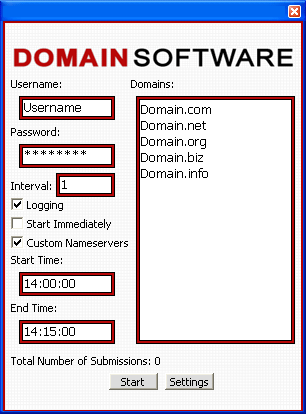
Next you enter the Domains you wish to register or grab during a drop. The software interfaces with eNom's API so it supports all domain extensions that eNom supports.
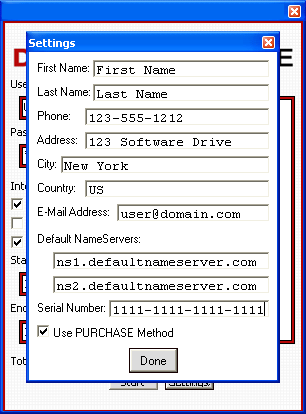
Lastly, before the domains are submitted for registration, you must fill out the Settings information which is required by eNom in order to register domains with the following extensions: .biz, .info and .name. If you do not wish to enter your own name servers then you can leave the fields blank and eNom's default name servers will be used instead. Your serial number is the number we send you after you purchase a license.
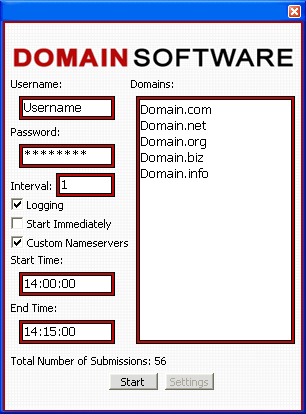
Above are the results for the submission of domains listed when Start Immediately is checked. Once you click Start it will become the Stop button. If Start Immediately is checked it will not stop on its own, you must stop it. The Average Number of Submissions lets you know approximately how many times each domain has been submitted to eNom. In this case each of the six domains above were submitted at an average of 56 times each. The results were logged.
III. Help:

Above is an internal program error that eNom Domain Grabber may cause while being used. If this error occurs you will be prompted with two options: to click Yes and send the error data that was logged to Domain Software, LLC. technicians to help resolve the problem, or to click No and have no data sent.
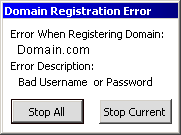
Above is an error eNom may return. If such an error is returned, it is merely a problem eNom produced while processing the data. If you should receive an error message from eNom’s servers the following will be produced: the Domain Registration Error Form will tell what domain created the error, the Error Code received from eNom, and the Error Description. You will have the option to either Stop All domains from being submitted to eNom or stop the domain that initiated the error by clicking Stop Current.